
Executive Summary
The Work Breakdown Structure (WBS) is widely recognized as the foundation of project planning. Yet, a WBS alone is an incomplete tool. It shows what must be delivered, but not what it means, who owns it, how success is measured, or what resources are required.
The WBS Dictionary fills this critical gap.
This guide provides the definitive, industry-grade reference for creating, using, and maintaining a WBS Dictionary. It goes beyond basic templates to explore advanced applications, integration with earned value management, agile adaptations, and common failure modes. By the end of this article, you will have the knowledge and tools to build a WBS Dictionary that transforms your project's scope baseline from a static document into a dynamic management instrument.
1. What is a WBS Dictionary?
1.1 The Core Concept
The WBS Dictionary is a formal, controlled project document that provides detailed, deliverable-level information for every element contained within the Work Breakdown Structure.
It is the descriptive companion to the visual WBS. While the WBS shows the hierarchical decomposition of deliverables, the Dictionary defines each element in precise, actionable terms.
1.2 Scope Baseline Triad
The WBS Dictionary is one of three inseparable components that form the Scope Baseline:
| Component | Primary Question Answered | Output Type |
|---|---|---|
| Scope Statement | "What is the project intended to achieve?" | Narrative description |
| Work Breakdown Structure (WBS) | "What are the deliverables required?" | Visual hierarchy |
| WBS Dictionary | "What does each deliverable mean in detail?" | Structured documentation |
The Iron Rule: Every element in the WBS must have a corresponding entry in the WBS Dictionary. No exceptions. No gaps.
1.3 The Relationship Between WBS and WBS Dictionary
The WBS and WBS Dictionary are not separate documents—they are two halves of a single scope definition.
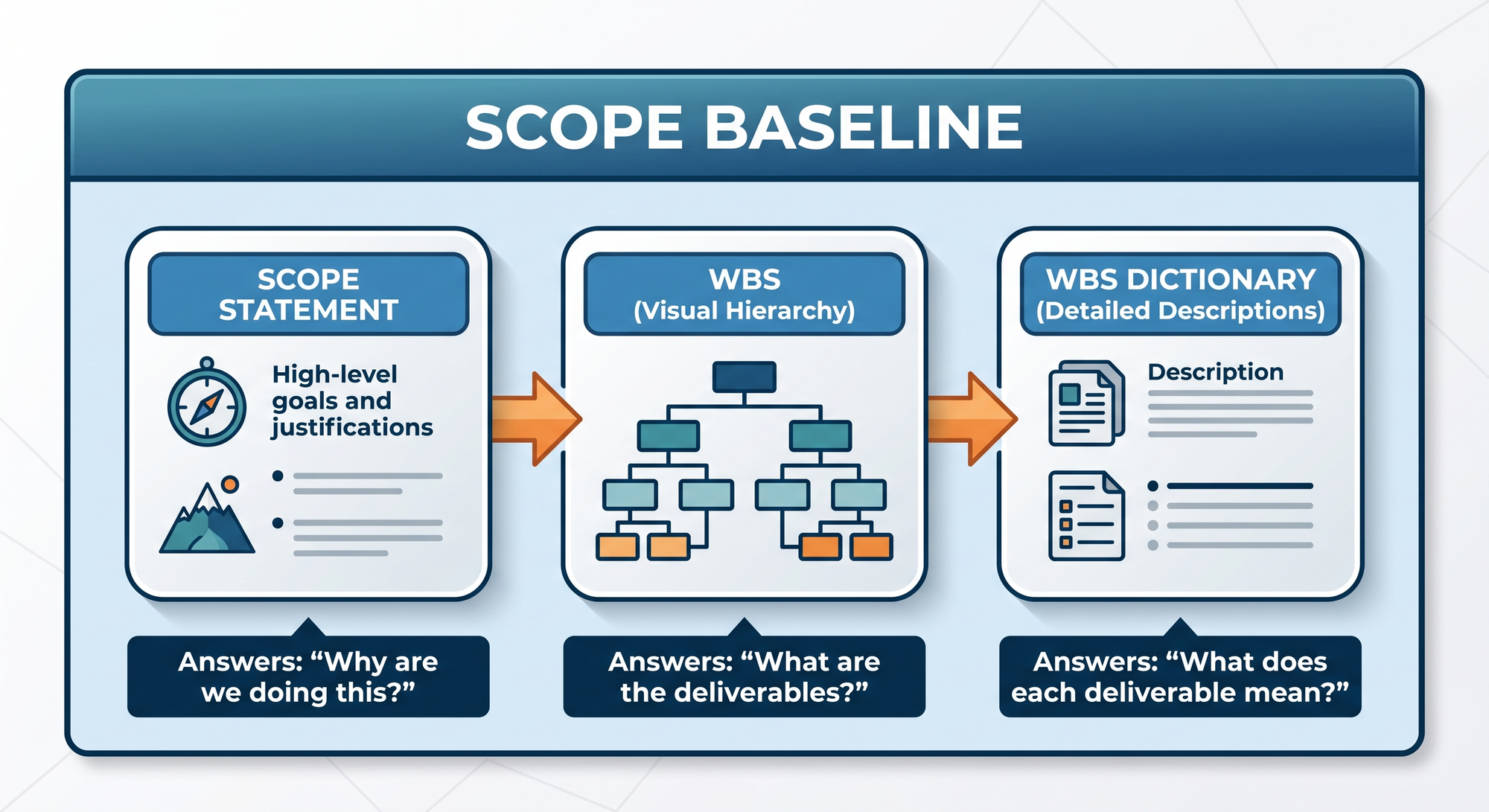
The Critical Insight: Without the Dictionary, the WBS is a list of labels. Without the WBS, the Dictionary is a disconnected set of descriptions. Together, they provide complete scope definition.
2. Why WBS Dictionary is a Strategic Imperative
2.1 Cost of WBS Dictionary Absence
When a project lacks a WBS Dictionary, the consequences are predictable and severe:
| Consequence | Description | Typical Impact |
|---|---|---|
| Ambiguous Ownership | No clear responsible party for deliverables | Work falls through cracks |
| Subjective Acceptance | "Done" is open to interpretation | Endless rework cycles |
| Budget Confusion | No allocation per deliverable | Cost overruns of 10-30% |
| Schedule Ambiguity | No milestones per deliverable | Missed deadlines |
| Scope Creep | Boundaries undefined | Uncontrolled expansion |
| Poor Communication | No single source of truth | Misaligned stakeholder expectations |
2.2 Strategic Benefits of a Well-Crafted WBS Dictionary
A comprehensive WBS Dictionary delivers measurable, strategic value:
-
Absolute Clarity: Every team member knows exactly what to deliver and what "complete" means.
-
Single-Point Accountability: Every element has a named owner. No ambiguity. No finger-pointing.
-
Granular Cost Control: Budgets are allocated per element, enabling precise tracking and variance analysis.
-
Objective Progress Measurement: Milestones are linked to specific deliverables, providing verifiable progress markers.
-
Proactive Risk Management: Known risks are documented per element, enabling targeted mitigation.
-
Effective Stakeholder Communication: The Dictionary serves as a single source of truth for scope details.
-
Formal Audit Trail: Documentation provides a baseline for audits, reviews, and lessons learned.
-
Contractual Protection: For client-facing projects, the Dictionary provides a clear basis for change orders and claims.
3. Complete WBS Dictionary Template
Below is the comprehensive, industry-standard WBS Dictionary template. Each field is explained with purpose, usage guidance, and examples.
3.1 WBS Dictionary Template Table
| SL | Item Name | Item Description |
|---|---|---|
| 1 | WBS Code | Enter the WBS Title and identify it as a Work Package, Planning Package, and/or Control Account. |
| 2 | Responsible Organization/Individual | Name the single organization, group, or individual responsible for ensuring the completion of the Work Package. Include contact information. |
| 3 | Description | Define the boundaries of the Work Package and clarify the scope content, including what is included and excluded. For Planning Packages, describe the known and unknown scope. |
| 4 | Deliverables | Identify the product, service, or results created upon completing the work in this Work Package. Include any critical intermediate deliverables. |
| 5 | Acceptance Criteria | Describe the functional and physical requirements necessary to meet customer expectations and quality standards. Include any unique approvals required for acceptance. |
| 6 | Budget | Allocate the budget for this Work Package, along with critical resource information and assumptions. |
| 7 | Milestones | List Start Dates, End Dates, Intermediate Milestones, Interdependencies, Constraints, and assumptions related to deliverables. |
| 8 | Risks | Include known threats and opportunities along with response strategies. |
| 9 | Additional Information | Provide any additional information such as references or related work packages. |
| 10 | Approvals | Date: Revised: |
3.2 Field-by-Field Deep Dive
Field 1: WBS Code
Purpose: Unique identification and hierarchical tracking.
What to Include:
- The unique WBS identifier (e.g., 3.1.2)
- The WBS Element Title (e.g., "User Authentication Module")
- The element classification: Work Package, Planning Package, or Control Account
Why It Matters: The WBS Code is the key that links the Dictionary to the WBS. Without consistent coding, cross-referencing becomes impossible.
Example:
WBS Code: 3.1.2
Title: User Authentication Module
Classification: Work Package
Best Practice: Use a consistent numbering system. Never reuse codes. Ensure codes match exactly between WBS and Dictionary.
Field 2: Responsible Organization/Individual
Purpose: Single-point accountability.
What to Include:
- Name of the individual or team
- Contact information (email, phone)
- Role or title
Why It Matters: Ambiguous ownership leads to work falling through the cracks. One person must be accountable.
Example:
Responsible: Sarah Johnson, Senior Developer
Contact: sarah.johnson@company.com
Team: Front-End Development Team
Critical Rule: One primary owner per element. Others may contribute or approve, but there is only one accountable party.
Field 3: Description
Purpose: Scope boundaries and clarity.
What to Include:
- What is included in this element
- What is explicitly excluded
- Any scope boundaries or constraints
Why It Matters: Without clear boundaries, scope creep is inevitable. The exclusion list is as important as the inclusion list.
Example:
Description:
Included: User login, password recovery, session management
Excluded: Social media authentication (covered in 3.1.3)
Included: Two-factor authentication
Excluded: Biometric authentication (future phase)
Best Practice: Use "Included" and "Excluded" sections explicitly. Never leave scope boundaries implicit.
Field 4: Deliverables
Purpose: Concrete outputs produced by this element.
What to Include:
- Primary deliverable(s)
- Intermediate deliverables
- Supporting documentation
Why It Matters: Deliverables are the tangible evidence of completion. They are what the customer receives.
Example:
Deliverables:
Functional login module
Password recovery workflow
Session management system
Technical documentation
Unit test results
Best Practice: List every deliverable, no matter how small. If it is not listed, it may be forgotten.
Field 5: Acceptance Criteria
Purpose: Objective definition of "Done."
What to Include:
- Functional requirements
- Quality standards
- Performance metrics
- Approval requirements
Why It Matters: Subjective acceptance criteria lead to disputes and rework. Objective criteria eliminate ambiguity.
Example:
Acceptance Criteria:
Login response time < 2 seconds
Password recovery via email and SMS
Session timeout after 15 minutes of inactivity
Zero critical security vulnerabilities
Approved by QA Lead and Security Officer
Best Practice: Use measurable, specific criteria. "Fast" is subjective; "< 2 seconds" is objective. Include approval requirements.
Field 6: Budget
Purpose: Financial allocation and tracking.
What to Include:
- Total budget for the element
- Resource allocation (hours, people)
- Cost assumptions
- Contingency reserves
Why It Matters: Budgets enable cost control and variance analysis. Without per-element budgets, cost overruns are invisible until too late.
Example:
Budget:
Total: $45,000
Resources: 3 developers, 1 QA (2 weeks)
Assumptions: No external dependencies
Contingency: 10% ($4,500)
Best Practice: Include assumptions and contingencies explicitly. Never hide buffer in vague estimates.
Field 7: Milestones
Purpose: Timeline and dependency tracking.
What to Include:
- Start date
- End date
- Intermediate milestones
- Dependencies on other elements
- Constraints
Why It Matters: Milestones provide progress markers and enable schedule tracking. Dependencies reveal critical path relationships.
Example:
Milestones:
Start: March 1, 2024
Design complete: March 5, 2024
Development complete: March 18, 2024
Testing complete: March 25, 2024
End: March 28, 2024
Depends on: 3.1.1 (UI Design)
Blocks: 3.4.1 (Integration Testing)
Best Practice: List dependencies explicitly. Identify what this element depends on and what depends on it.
Field 8: Risks
Purpose: Proactive risk management.
What to Include:
- Known threats
- Potential opportunities
- Response strategies
Why It Matters: Risks are best managed at the element level, where they are specific and actionable.
Example:
Risks:
Threat: Third-party authentication API downtime
Response: Implement fallback authentication
Threat: Security vulnerability discovered
Response: Engage external security audit
Opportunity: Reusable code for future projects
Response: Document modular architecture
Best Practice: Include both threats and opportunities. Risk management is not just about avoiding problems; it is also about capturing value.
Field 9: Additional Information
Purpose: Contextual reference and cross-links.
What to Include:
- Related work packages
- Reference documents
- Technical specifications
- Lessons learned from past projects
Why It Matters: Additional information prevents reinventing the wheel and ensures consistency.
Example:
Additional Information:
Related: 3.1.3 (Social Media Authentication)
Reference: Security Policy v2.1
Reference: UX Design Spec #45
Template: Standard Module Documentation
Best Practice: Link to all relevant documents and related elements. The Dictionary should be a hub, not an island.
Field 10: Approvals
Purpose: Formal sign-off and change tracking.
What to Include:
- Date of approval
- Revision history
- Approver names and titles
Why It Matters: Approvals create accountability and provide an audit trail for changes.
Example:
Approvals:
Date: February 28, 2024
Revised: March 15, 2024 (v1.1)
Approved by: Project Manager, QA Lead
Best Practice: Record every revision. Never overwrite history. Maintain a version log.
4. How to Create a WBS Dictionary: Complete Methodology
Creating a WBS Dictionary follows a structured, hierarchical approach. Here is the full methodology, designed for practical application.
Phase 1: Preparation
Step 1.1: Assemble the Right Team
The WBS Dictionary cannot be created by a project manager alone. You need input from:
- Subject Matter Experts (SMEs): Those who understand the technical work
- Business Stakeholders: Those who understand the business requirements
- Quality Assurance: Those who understand acceptance criteria
- Finance: Those who understand budget allocation
- Procurement: Those who understand vendor deliverables
Action: Schedule a dedicated WBS Dictionary workshop. This is a working session, not a meeting.
Step 1.2: Validate the WBS (100% Rule)
Before documenting the WBS, ensure it is complete.
Actions:
- Review the WBS with SMEs.
- Verify compliance with the 100% Rule.
- Identify any gaps or overlaps.
- Revise the WBS as needed.
- Obtain sign-off on the revised WBS.
Key Question: "Does the WBS capture 100% of the project scope?"
Tool: Use the Requirements Traceability Matrix to verify completeness.
Phase 2: Top-Down Documentation
Step 2.1: Create Level 1 Element Content
Objective: Document the top-level WBS elements at a summary level.
Actions:
- Take the WBS Dictionary template.
- For each Level 1 element, complete the following fields:
- WBS Code and Title
- Description (boundaries, inclusions, exclusions)
- Primary Deliverables
- Acceptance Criteria (summary level)
- Budget (summary level)
- Milestones (key milestones)
- Risks (key risks)
Best Practice: Keep Level 1 entries at a summary level. Details will be added at lower levels.
Example (Level 1 Entry):
WBS Code: 3.0
Title: Application Development
Description: All software development activities
Deliverables: Functional application
Budget: $500,000 (summary)
Milestones: Start Jan 1, End June 30
Risks: Technical complexity, resource availability
Step 2.2: Confirm Level 1 Elements
Objective: Validate alignment between WBS and WBS Dictionary.
Actions:
- Compare Level 1 elements in the WBS with the Dictionary entries.
- Identify any discrepancies.
- Revise either the WBS or the Dictionary as needed.
- Verify that Level 1 elements collectively capture 100% of project scope.
Key Question: "Do the Level 1 WBS Dictionary entries align with the WBS structure?"
Phase 3: Drill Down
Step 3.1: Create Level 2 Element Content
Objective: Document the second level of the WBS with increased detail.
Actions:
- Use the same WBS Dictionary template.
- For each Level 2 element, complete all fields.
- Increase detail compared to Level 1.
- Maintain consistency with parent-level entries.
Example (Level 2 Entry):
WBS Code: 3.1
Title: Front-End Components
Description: All user-facing components
Deliverables: UI Modules
Budget: $200,000
Milestones: Start Jan 15, End April 30
Risks: UI/UX design changes, browser compatibility
Step 3.2: Continue to Work Package Level
Objective: Document all levels down to the Work Package level with maximum detail.
Actions:
- Continue decomposing and documenting until every Work Package has a complete entry.
- For Work Packages, complete all 10 fields with maximum detail.
Key Distinction: Work Packages require the most detailed documentation because they are the level at which work is executed, tracked, and controlled.
Phase 4: Validation
Step 4.1: The 100% Rule Audit
Objective: Ensure the WBS Dictionary captures the entire project scope.
Actions:
- Review every element in the WBS.
- Confirm every WBS element has a corresponding Dictionary entry.
- Verify that Dictionary entries collectively capture 100% of the project scope.
- Check for consistency between parent and child entries.
Checklist:
- Every WBS element has a Dictionary entry
- Every Dictionary entry maps to a WBS element
- All 10 fields are completed for Work Packages
- Parent-child relationships are consistent
- No gaps or overlaps in scope coverage
Step 4.2: The Stakeholder Review
Objective: Obtain formal validation and sign-off.
Actions:
- Present the WBS Dictionary to stakeholders.
- Address any questions or concerns.
- Revise as needed.
- Obtain formal sign-off.
Key Question: "Does this WBS Dictionary accurately and completely define the project scope?"
Action: Document the sign-off. This creates accountability and provides a baseline for future scope changes.
5. Practical Usage of WBS Dictionary Throughout the Project Lifecycle
The WBS Dictionary is not a static document. It is a living tool used throughout the project lifecycle.
5.1 Work Authorization
How It Works:
The WBS Dictionary provides the detailed information needed to authorize work. When a team member is assigned to a Work Package, the Dictionary entry serves as their work authorization.
What to Extract:
- Scope description (what to do)
- Acceptance criteria (what "Done" means)
- Budget (resource limits)
- Milestones (deadlines)
Example:
A Work Authorization Document for the "User Authentication Module" would reference the Dictionary entry for WBS Code 3.1.2, pulling in the description, acceptance criteria, budget, and milestones.
5.2 Schedule Development
How It Works:
The WBS Dictionary is the primary input for creating schedule activities.
Process:
- Take a Work Package from the WBS Dictionary.
- Decompose it into schedule activities (tasks).
- Assign durations, dependencies, and resources.
- Build the schedule in a Gantt chart format.
Example:
Work Package: User Authentication Module (3.1.2)
Decomposed Activities:
| Activity | Duration | Predecessor |
|---|---|---|
| Design login UI | 2 days | - |
| Develop backend logic | 5 days | Design login UI |
| Implement password recovery | 3 days | Develop backend logic |
| Conduct unit testing | 2 days | Implement password recovery |
| Security review | 2 days | Conduct unit testing |
5.3 Cost Estimation and Budgeting
How It Works:
The WBS Dictionary provides budget information at the Work Package level. This is used to build cost estimates.
Process:
- Take the budget from each Work Package in the Dictionary.
- Aggregate costs up the WBS hierarchy.
- Build the project budget.
Example (Aggregation):
| WBS Level | WBS Code | Budget |
|---|---|---|
| Work Package | 3.1.1 | $30,000 |
| Work Package | 3.1.2 | $45,000 |
| Work Package | 3.1.3 | $25,000 |
| Subtotal (Level 2) | 3.1 | $100,000 |
| Work Package | 3.2.1 | $50,000 |
| Subtotal (Level 2) | 3.2 | $50,000 |
| Total (Level 1) | 3.0 | $150,000 |
5.4 Earned Value Management (EVM)
How It Works:
The WBS Dictionary provides the budget and milestone information needed for Earned Value Management.
EVM Metrics Enabled by the WBS Dictionary:
- Planned Value (PV): Budgeted cost of planned work
- Earned Value (EV): Budgeted cost of completed work
- Actual Cost (AC): Actual cost of completed work
- Schedule Variance (SV): EV - PV
- Cost Variance (CV): EV - AC
- Schedule Performance Index (SPI): EV / PV
- Cost Performance Index (CPI): EV / AC
Critical Insight: Without the WBS Dictionary, EVM cannot be accurately performed because there is no basis for measuring planned vs. actual progress.
5.5 Scope Control and Change Management
How It Works:
The WBS Dictionary serves as the scope baseline. Any proposed change to scope must reference the Dictionary.
Process:
- A stakeholder requests a scope change.
- The change is evaluated against the WBS Dictionary.
- Impact assessment is performed using Dictionary data.
- If approved, the WBS and Dictionary are updated.
- The revision is documented.
Value: The Dictionary provides the detail needed to assess the impact of scope changes accurately.
5.6 Performance Measurement and Reporting
How It Works:
The WBS Dictionary provides the basis for measuring project performance.
Metrics Enabled:
- Deliverable completion rate
- Milestone achievement rate
- Budget variance by element
- Schedule variance by element
- Risk status by element
Reporting: Status reports can be structured around WBS elements, providing granular visibility into project health.
5.7 Communication and Stakeholder Management
How It Works:
The WBS Dictionary serves as a communication tool, providing stakeholders with a clear understanding of what the project will deliver.
Value:
- Sets expectations
- Reduces misunderstandings
- Provides a reference for status updates
- Enables informed decision-making
Best Practice: Share relevant Dictionary entries with stakeholders during status meetings and reviews.
6. Common Pitfalls and How to Avoid Them
6.1 Pitfall: Incomplete Entries
The Mistake: Filling out only some fields in the template.
Why It Matters: Missing information leads to ambiguity and confusion.
The Fix: Make all 10 fields mandatory. Use a checklist to ensure completeness.
6.2 Pitfall: Vague Acceptance Criteria
The Mistake: Using subjective language like "user-friendly" or "fast."
Why It Matters: Subjective criteria lead to disputes and rework.
The Fix: Use measurable, specific criteria. "Login response time < 2 seconds" is objective; "fast login" is not.
6.3 Pitfall: Duplicate Responsibility
The Mistake: Assigning multiple owners to a single element.
Why It Matters: Shared responsibility often becomes no responsibility.
The Fix: Assign one primary owner per element. Others can be contributors or approvers, but there is only one accountable party.
6.4 Pitfall: Neglecting the Exclusion List
The Mistake: Describing what is included but not what is excluded.
Why It Matters: Without exclusions, scope boundaries are ambiguous, inviting scope creep.
The Fix: Explicitly list what is NOT included in every element description.
6.5 Pitfall: Stale Documentation
The Mistake: Creating the WBS Dictionary once and never updating it.
Why It Matters: An outdated Dictionary is worse than no Dictionary—it provides false confidence.
The Fix: Update the Dictionary whenever:
- Scope changes
- Budgets are revised
- Milestones shift
- Risks materialize or change
6.6 Pitfall: Inconsistency Between WBS and Dictionary
The Mistake: WBS Codes or element names not matching between the two documents.
Why It Matters: Inconsistency creates confusion and undermines trust in both documents.
The Fix: Conduct regular cross-reference audits. Use automated tools if available.
6.7 Pitfall: Overly Detailed Level 1 Entries
The Mistake: Providing Work Package-level detail at Level 1.
Why It Matters: Overly detailed Level 1 entries become outdated quickly and create maintenance burden.
The Fix: Keep higher-level entries at a summary level. Reserve detailed entries for Work Packages.
7. WBS Dictionary and Agile Methodologies
The WBS Dictionary is often associated with Waterfall project management, but its principles apply equally to Agile environments.
7.1 How Agile Handles the WBS Dictionary Concept
In Agile, the equivalent of the WBS Dictionary is found in:
| Traditional Field | Agile Equivalent |
|---|---|
| WBS Code | Story ID or Epic ID |
| Description | User Story Description |
| Deliverables | Story Deliverables |
| Acceptance Criteria | Acceptance Criteria (Given/When/Then) |
| Budget | Story Points or Time Estimate |
| Milestones | Sprint Assignment |
| Responsible Party | Story Assignee |
| Risks | Sprint Risks or Blockers |
7.2 Adapting the Template for Agile
For Agile projects, the WBS Dictionary template can be adapted:
User Story Dictionary Entry Example:
Story ID: US-045
Title: User Login
Description: As a user, I want to log in securely
Acceptance Criteria:
Given valid credentials, when user logs in, then access is granted
Given invalid credentials, when user logs in, then error is shown
Given 3 failed attempts, when user logs in, then account is locked
Story Points: 5
Sprint: Sprint 4
Assignee: Sarah Johnson
Risks: Third-party authentication API downtime
The Rule: Regardless of methodology, the principle of documenting scope details remains essential.
8. WBS Dictionary and Earned Value Management (EVM)
8.1 Why EVM Requires the WBS Dictionary
Earned Value Management is a powerful technique for measuring project performance, but it requires a solid foundation of scope, schedule, and budget data. The WBS Dictionary provides that foundation.
8.2 The Control Account Concept
A Control Account is a management control point where scope, budget, actual cost, and schedule are integrated and compared to earned value for performance measurement.
How the WBS Dictionary Enables Control Accounts:
- The Dictionary identifies which WBS elements serve as Control Accounts.
- It provides the budget and milestone data needed for EVM calculations.
- It defines the scope boundary for each Control Account.
8.3 EVM Metrics Enabled by the WBS Dictionary
| Metric | Formula | Required Dictionary Data |
|---|---|---|
| Planned Value (PV) | Budgeted cost of planned work | Budget, Milestones |
| Earned Value (EV) | Budgeted cost of completed work | Budget, Deliverables, Acceptance Criteria |
| Actual Cost (AC) | Actual cost of completed work | Budget (baseline for comparison) |
| Schedule Variance (SV) | EV - PV | Budget, Milestones |
| Cost Variance (CV) | EV - AC | Budget |
| Schedule Performance Index (SPI) | EV / PV | Budget, Milestones |
| Cost Performance Index (CPI) | EV / AC | Budget |
Critical Insight: Without the WBS Dictionary, EVM cannot be accurately performed because there is no basis for measuring planned vs. actual progress at the element level.
9. Frequently Asked Questions
Q1: "Is the WBS Dictionary required by PMI standards?"
Answer: Yes. The PMBOK® Guide identifies the WBS Dictionary as a critical component of the Scope Baseline. For projects seeking PMI certification or following PMI standards, the WBS Dictionary is expected.
Q2: "How detailed should the WBS Dictionary be?"
Answer: Detailed enough to enable clear execution, accurate tracking, and objective acceptance. Work Packages should have maximum detail; higher-level elements can have summary-level information.
Q3: "Can I use a software tool to manage the WBS Dictionary?"
Answer: Yes. Many project management tools (MS Project, Jira, Asana, etc.) support WBS Dictionary creation and maintenance. The key is consistency and accessibility.
Q4: "Who creates the WBS Dictionary?"
Answer: The Project Manager leads the creation, with input from subject matter experts, team members, and stakeholders. It is a collaborative effort.
Q5: "How often should the WBS Dictionary be updated?"
Answer: The Dictionary should be reviewed regularly (e.g., at each phase gate or sprint review) and updated whenever scope, budget, schedule, or risks change.
Q6: "What is the difference between a WBS Dictionary and a WBS?"
Answer: The WBS is a visual hierarchy of deliverables. The WBS Dictionary is the accompanying document that provides detailed descriptions of each element in that hierarchy. They are complementary, not interchangeable.
Q7: "Can a small project skip the WBS Dictionary?"
Answer: Even small projects benefit from a simplified WBS Dictionary. The level of detail can be reduced, but the core fields (description, acceptance criteria, responsible party) should still be documented.
Q8: "How does the WBS Dictionary support earned value management?"
Answer: The WBS Dictionary provides the budget and milestone information needed to calculate earned value metrics. Without the Dictionary, EVM cannot be accurately performed.
Q9: "What is the relationship between the WBS Dictionary and the Risk Register?"
Answer: The WBS Dictionary identifies risks at the element level. The Risk Register consolidates these risks and provides detailed risk response planning. The Dictionary feeds the Risk Register.
Q10: "Can the WBS Dictionary be used for contract management?"
Answer: Yes. For client-facing projects, the WBS Dictionary provides a clear basis for contractual agreements, change orders, and claims. It defines exactly what is in scope and what is not.
10. Conclusion: The WBS Dictionary as a Foundation for Mastery
The WBS Dictionary is not a bureaucratic overhead—it is a strategic asset. It transforms the WBS from a visual diagram into an actionable management tool that provides:
- Absolute Clarity: Everyone knows what to do and what "Done" means.
- Single-Point Accountability: Every element has a named owner.
- Granular Control: Budgets, milestones, and risks are tracked with precision.
- Effective Communication: Stakeholders share a common understanding of scope.
10.1 Key Takeaways
- The WBS Dictionary is essential: It completes the Scope Baseline alongside the Scope Statement and WBS.
- Use the 10-field template: It ensures comprehensive documentation.
- Follow the hierarchical approach: Build the Dictionary top-down, from Level 1 to Work Packages.
- Validate with the 100% Rule: Ensure the Dictionary captures the entire project scope.
- Leverage throughout the lifecycle: Use the Dictionary for work authorization, scheduling, budgeting, scope control, EVM, and performance measurement.
- Keep it updated: A living document is valuable; a stale one is dangerous.
- Adapt for Agile: The principles apply regardless of methodology.
10.2 The Ultimate Benefit
When you build a comprehensive WBS Dictionary, you create a single source of truth for project scope. Your team knows exactly what to do. Your stakeholders know exactly what to expect. Your project has a solid foundation for success.
The WBS Dictionary is not just a document—it is a commitment to clarity, accountability, and professional excellence.
Appendix A: Printable WBS Dictionary Template
| SL | Item Name | Item Description |
|---|---|---|
| 1 | WBS Code | Enter the WBS Title and identify it as a Work Package, Planning Package, and/or Control Account. |
| 2 | Responsible Organization/Individual | Name the single organization, group, or individual responsible for ensuring the completion of the Work Package. Include contact information. |
| 3 | Description | Define the boundaries of the Work Package and clarify the scope content, including what is included and excluded. For Planning Packages, describe the known and unknown scope. |
| 4 | Deliverables | Identify the product, service, or results created upon completing the work in this Work Package. Include any critical intermediate deliverables. |
| 5 | Acceptance Criteria | Describe the functional and physical requirements necessary to meet customer expectations and quality standards. Include any unique approvals required for acceptance. |
| 6 | Budget | Allocate the budget for this Work Package, along with critical resource information and assumptions. |
| 7 | Milestones | List Start Dates, End Dates, Intermediate Milestones, Interdependencies, Constraints, and assumptions related to deliverables. |
| 8 | Risks | Include known threats and opportunities along with response strategies. |
| 9 | Additional Information | Provide any additional information such as references or related work packages. |
| 10 | Approvals | Date: Revised: |
Appendix B: WBS Dictionary Quality Checklist
Use this checklist to validate your WBS Dictionary:
Completeness
- Every WBS element has a Dictionary entry
- All 10 fields are completed for Work Packages
- Summary-level entries exist for higher-level elements
- Contact information is included for responsible parties
Correctness
- WBS Codes match the WBS hierarchy
- Descriptions clearly define inclusions and exclusions
- Acceptance criteria are specific and measurable
- Budgets align with the project budget
- Milestones align with the project schedule
Consistency
- Parent and child entries are aligned
- Terminology is consistent throughout
- Formatting is consistent across entries
- Approval dates are documented
Integration
- Dictionary links to Risk Register
- Dictionary feeds Schedule Development
- Dictionary supports Earned Value Management
- Dictionary used for Work Authorization
Appendix C: Example WBS Dictionary Entry (Fully Completed)
Here is a complete, filled-out example for reference:
┌─────────────────────────────────────────────────────────────┐
│ WBS DICTIONARY ENTRY │
├─────────────────────────────────────────────────────────────┤
│ WBS Code: 3.1.2 │
│ Title: User Authentication Module │
│ Classification: Work Package │
├─────────────────────────────────────────────────────────────┤
│ Responsible Organization/Individual: │
│ - Sarah Johnson, Senior Developer │
│ - Contact: sarah.johnson@company.com │
│ - Team: Front-End Development Team │
├─────────────────────────────────────────────────────────────┤
│ Description: │
│ - Included: User login, password recovery, session │
│ management, two-factor authentication │
│ - Excluded: Social media authentication (3.1.3), │
│ biometric authentication (future phase) │
├─────────────────────────────────────────────────────────────┤
│ Deliverables: │
│ - Functional login module │
│ - Password recovery workflow │
│ - Session management system │
│ - Two-factor authentication integration │
│ - Technical documentation │
│ - Unit test results │
├─────────────────────────────────────────────────────────────┤
│ Acceptance Criteria: │
│ - Login response time < 2 seconds │
│ - Password recovery via email and SMS │
│ - Session timeout after 15 minutes of inactivity │
│ - Zero critical security vulnerabilities │
│ - Approved by QA Lead and Security Officer │
├─────────────────────────────────────────────────────────────┤
│ Budget: │
│ - Total: $45,000 │
│ - Resources: 3 developers, 1 QA (2 weeks) │
│ - Assumptions: No external dependencies │
│ - Contingency: 10% ($4,500) │
├─────────────────────────────────────────────────────────────┤
│ Milestones: │
│ - Start: March 1, 2024 │
│ - Design complete: March 5, 2024 │
│ - Development complete: March 18, 2024 │
│ - Testing complete: March 25, 2024 │
│ - End: March 28, 2024 │
│ - Depends on: 3.1.1 (UI Design) │
│ - Blocks: 3.4.1 (Integration Testing) │
├─────────────────────────────────────────────────────────────┤
│ Risks: │
│ - Threat: Third-party authentication API downtime │
│ Response: Implement fallback authentication │
│ - Threat: Security vulnerability discovered │
│ Response: Engage external security audit │
│ - Opportunity: Reusable code for future projects │
│ Response: Document modular architecture │
├─────────────────────────────────────────────────────────────┤
│ Additional Information: │
│ - Related: 3.1.3 (Social Media Authentication) │
│ - Reference: Security Policy v2.1 │
│ - Reference: UX Design Spec #45 │
│ - Template: Standard Module Documentation │
├─────────────────────────────────────────────────────────────┤
│ Approvals: │
│ - Date: February 28, 2024 │
│ - Revised: March 15, 2024 (v1.1) │
│ - Approved by: Project Manager, QA Lead │
└─────────────────────────────────────────────────────────────┘
Appendix D: Quick Reference Card
WBS Dictionary at a Glance
What: A formal document providing detailed descriptions for every WBS element.
Why: Completes the Scope Baseline. Enables clarity, accountability, and control.
When: Created after the WBS is finalized. Updated throughout the project lifecycle.
Who: Project Manager leads creation, with input from SMEs and stakeholders.
How: Top-down approach, from Level 1 to Work Packages, using the 10-field template.
Key Fields: WBS Code, Responsible Party, Description, Deliverables, Acceptance Criteria, Budget, Milestones, Risks.
Golden Rule: Every WBS element must have a Dictionary entry. No exceptions.
This guide is intended as a comprehensive reference for project management professionals. It aligns with PMI standards and industry best practices. For specific project needs, consult with your PMO or project management office.